Steelcase
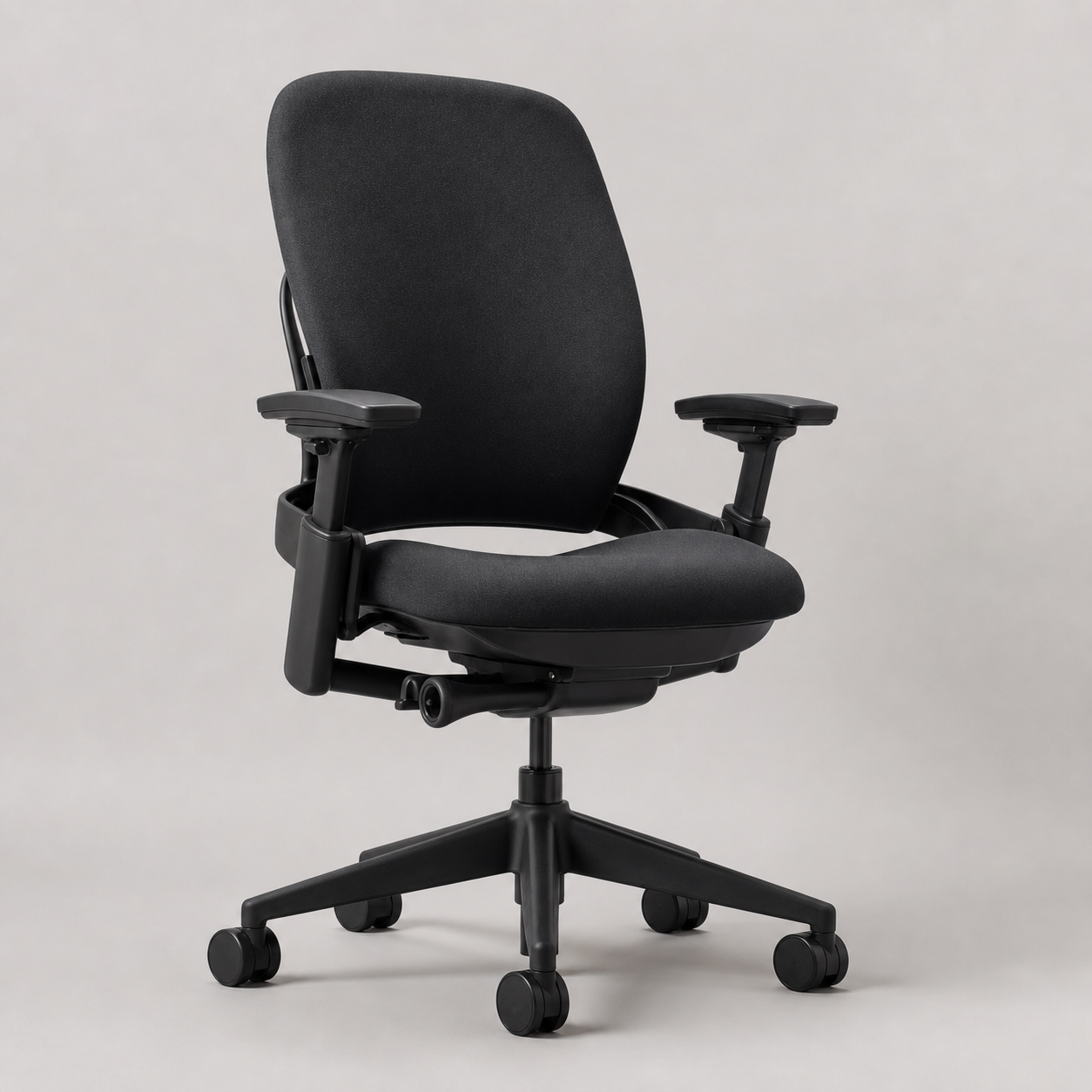
Steelcase Leap Ergonomic Office Chair — Black / Black Frame
A highly adjustable upholstered task chair whose LiveBack system and Natural Glide recline prioritize movement over a fixed “correct” pose. This black-on-black configuration is the visual baseline for a serious home office.
Buy on Brand Site →Affiliate link — same price for you, supports Design Hunting.
Pros & Cons
What we like
- LiveBack changes shape with the spine
- Four-dimensional arms support varied desk work
- Natural Glide keeps the user oriented toward the work surface
- 400 lb capacity and 12-year multi-shift warranty
Watch out for
- Configured price enters premium-chair territory
- Upholstered back retains more heat than mesh
- Many controls demand careful initial setup
Renter-Safe Verified
This product can be used, installed, or placed without drilling, nailing, or permanently modifying your rental. When you move out, it comes with you — and your deposit stays intact.
The best ergonomic chair is not the one with the longest feature list; it is the one whose adjustments continue to work as posture changes through the day. This chair's case rests on that principle. Its upholstered back bends with the user, while the seat and arms can be tuned for typing, reading and reclined calls.
LiveBack instead of a rigid shell
Steelcase's LiveBack system is designed to change shape as the spine moves. That is materially different from placing a lumbar pad against an otherwise fixed back. The black upholstered back feels visually softer in a residential office than exposed technical mesh, although fabric will retain more warmth than an Aeron's Pellicle suspension.
The seat depth, lumbar support, recline resistance and arm position can be adjusted. Standard four-dimensional arms move in height, width, depth and pivot, useful when alternating between a centered keyboard and wider input devices. Steelcase rates the chair to 400 pounds, unusually broad support in the premium task-chair market.
Movement at the desk
Natural Glide allows the seat to travel as the user reclines, helping keep eyes and hands oriented toward the work surface. The value is not dramatic rocking; it is reducing the tendency to crane the neck forward after leaning back. Correct setup still matters. Seat depth should leave space behind the knees, arms should meet the desk without lifting the shoulders, and recline resistance should match body weight.
Living with upholstery
Black fabric disguises everyday marks and avoids the clinical look of gray mesh, but it needs periodic vacuuming and prompt treatment of spills. The mechanism-heavy underside is more complicated than a simple swivel chair. That complexity is defensible because Steelcase backs Leap with a 12-year, multi-shift parts-and-labor warranty, a stronger durability signal than vague “limited lifetime” marketing with broad exclusions.
Delivery and setup
The official store states that shipping time varies with fabric and frame options and advertises free FedEx delivery. Confirm the selected configuration and current lead time before payment. After arrival, budget time for ergonomic adjustment even if major chair assembly is minimal; a poorly tuned premium chair can feel worse than a familiar basic one.
Price position and alternatives
At the official store price observed for this configuration, $2,023 places it beside the most expensive mainstream task chairs. Herman Miller Aeron is the better comparison for users who prioritize breathable mesh and three fitted sizes. Steelcase Gesture is the sibling alternative for unusually broad arm movement and device-heavy work. Leap is the stronger choice when an upholstered back, flexible lumbar behavior and seat-depth tuning lead the brief.
Verdict
This is for an eight-hour workstation where adjustment range, warranty and repairable mechanisms justify a furniture-scale investment. It is excessive for occasional email and risky for buyers unwilling to spend time dialing in controls. The black-on-black finish is intentionally anonymous; the design value is in how the chair moves, not in making the office look futuristic.
Best For
- Eight-hour home office workstation
- Architecture or design studio with long seated sessions
- Shared desk requiring repeatable adjustment
- Premium sit-stand desk pairing
Setup & Install
Official-store shipping timing varies by fabric and frame selection; free FedEx delivery is advertised. On arrival, set seat depth, lumbar support, recline resistance and all four arm dimensions before judging comfort.
FAQ
How durable is the Steelcase Leap chair?
Steelcase rates the chair for users up to 400 pounds and backs it with a 12-year multi-shift parts-and-labor warranty. Those published terms are stronger evidence than isolated longevity anecdotes, though fabric wear still depends on use and care.
Steelcase Leap vs Herman Miller Aeron: which is better?
Leap favors an upholstered, shape-changing back and extensive seat-depth tuning. Aeron favors breathable suspension mesh and size-specific shells; choose it if heat management matters more than the softer residential appearance of fabric.
Is the Leap worth more than a basic office chair?
For full workdays, the premium buys LiveBack movement, Natural Glide recline, four-dimensional arms, broad adjustability and a long commercial-grade warranty. Occasional users may not extract enough value from those systems to justify the official-store price.
Does Steelcase Leap require setup?
The important setup is ergonomic rather than merely mechanical. Adjust seat depth to clear the knees, place the arms so shoulders stay relaxed, tune lumbar support, and match recline resistance to your body before evaluating the chair.